

Chime AI Trust & Customer Controls
AI in Chime is optional, and your organization decides how it works. See who turns it on, what it can do, how people stay in the loop, and which services handle your data.
At a glance
- Does every tenant use AI?
- No. AI is optional and enabled by tenant.
- Who approves and configures it?
- The customer approves enablement. Authorized tenant administrators configure the features.
- Can human agents change AI replies?
- Yes. Your human agents can edit or discard AI suggestions before sending.
- What powers the AI features?
- Azure OpenAI supports generation features; Azure services support translation.
- How does human handoff work?
- Routing and failure handling depend on the configured chat workflow/pipeline.
- Have another question?
- Email us about your tenant, enabled features, or review.
AI is a tenant choice
Chime V5 is a multi-tenant platform. Customers choose whether to enable optional AI capabilities. Each customer's enabled features and configured workflows determine how the service operates.
Connect people through a workflow
A chat workflow/pipeline collects requests and routes users to human agents. Human teams handle the conversation.
Add assistance where it helps
Use configured AI steps, reply suggestions for human agents, summaries, or translation alongside the tenant's support workflow.
Where AI is used
These capabilities are optional. Availability and behavior depend on the enabled features, permissions, and configuration.
Customer-facing answers
Optional AI can help answer FAQ questions within a chat workflow/pipeline. Its behavior depends on the configured knowledge sources and prompts.
Reply suggestions for human agents
Chime's Agent Assistance feature uses Azure OpenAI to suggest replies to your human support agents. The human agent chooses whether to use, edit, or discard each suggestion before sending.
Session summaries
Optional Azure OpenAI features can summarize chat sessions to help teams review conversations.
Translation
Azure translation services support multilingual conversations where the feature is enabled and configured.
See the configuration
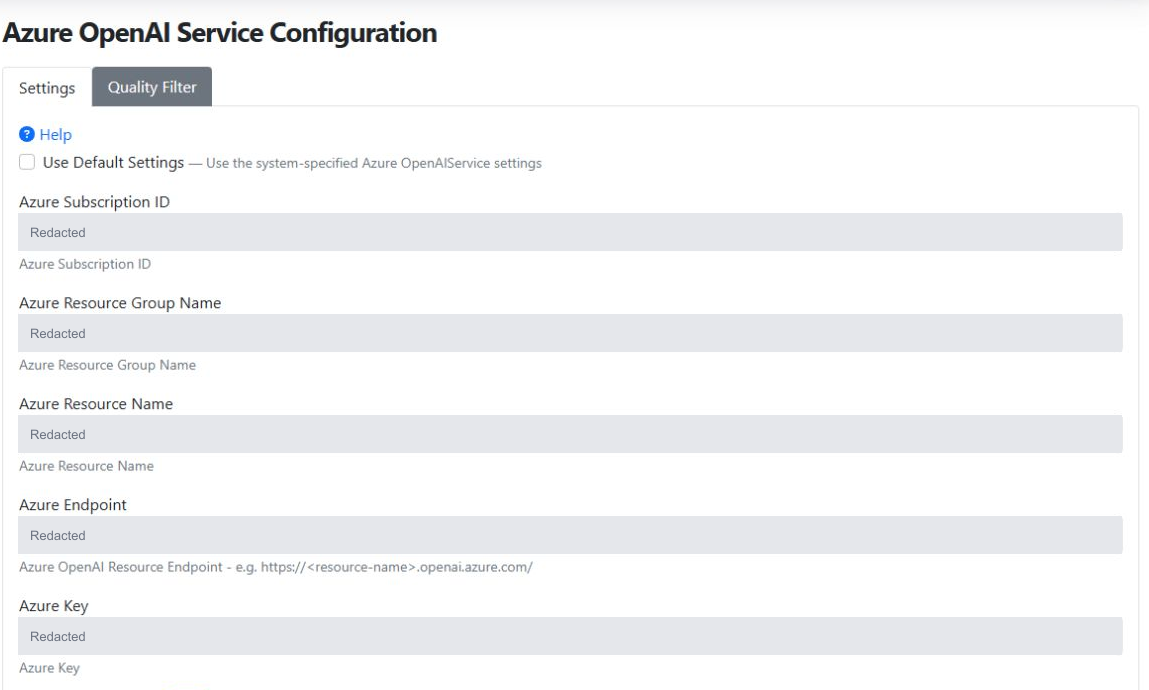
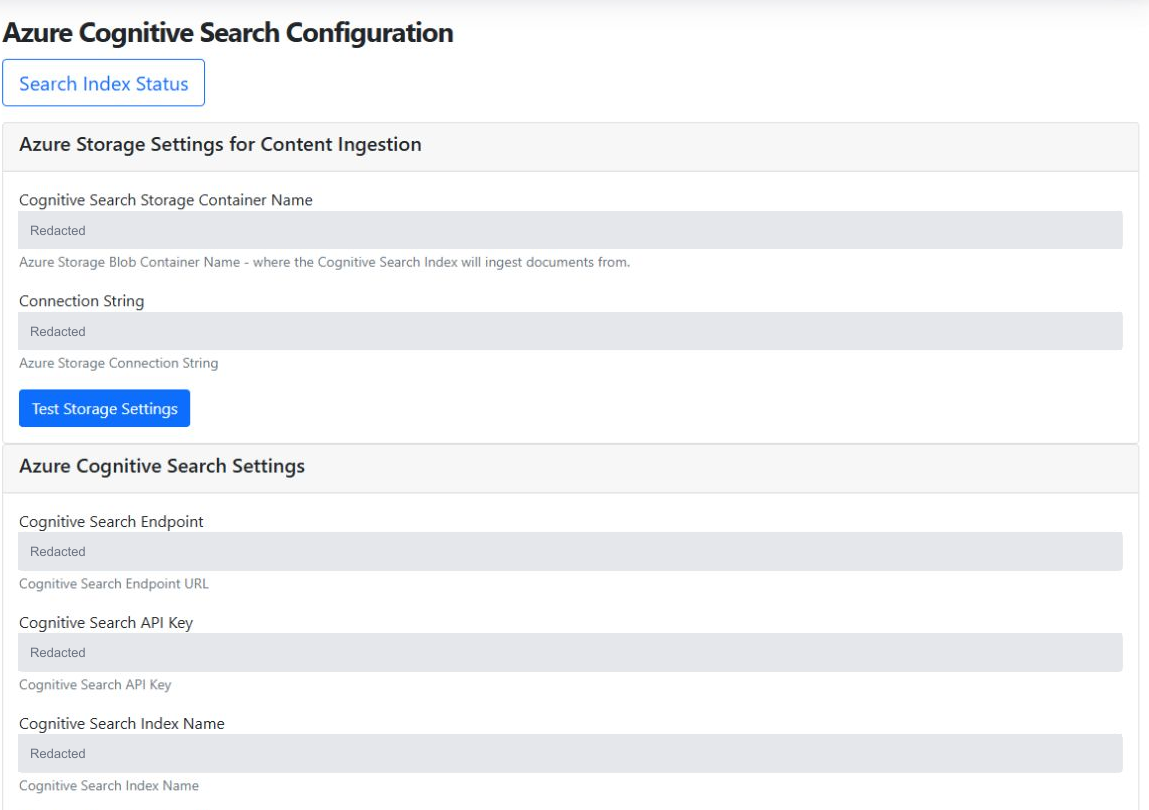
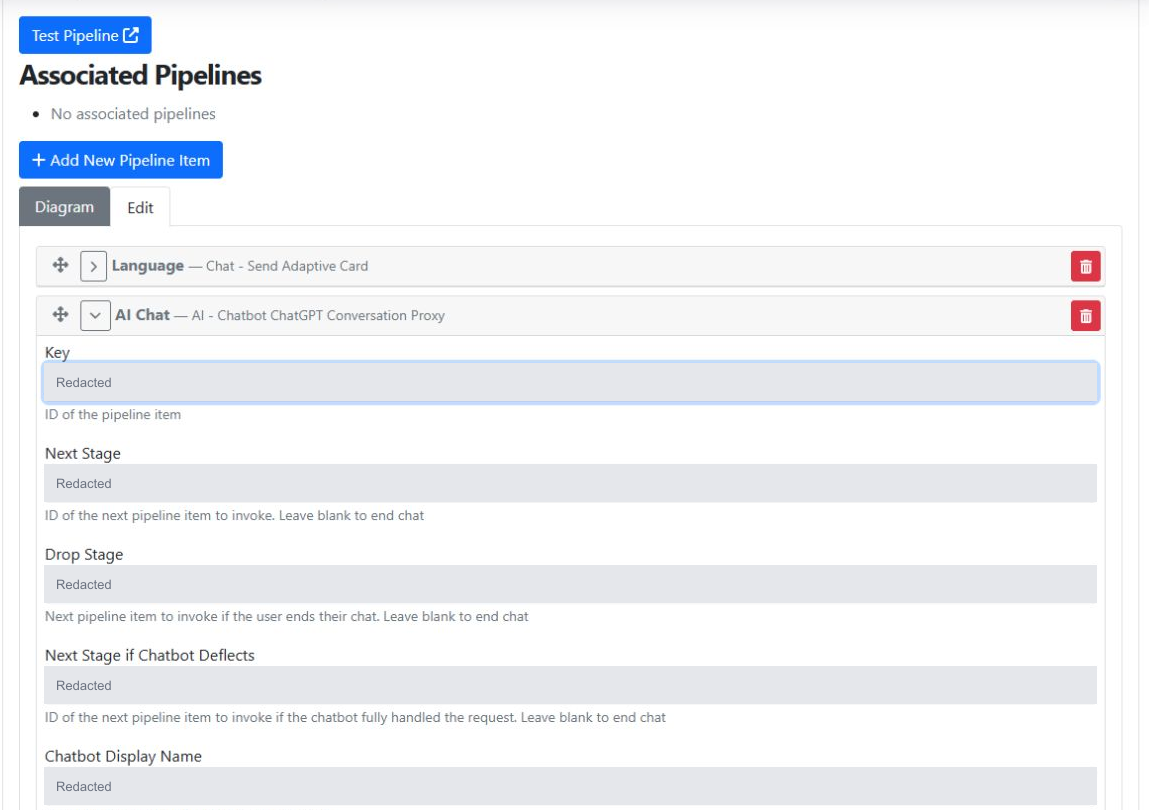
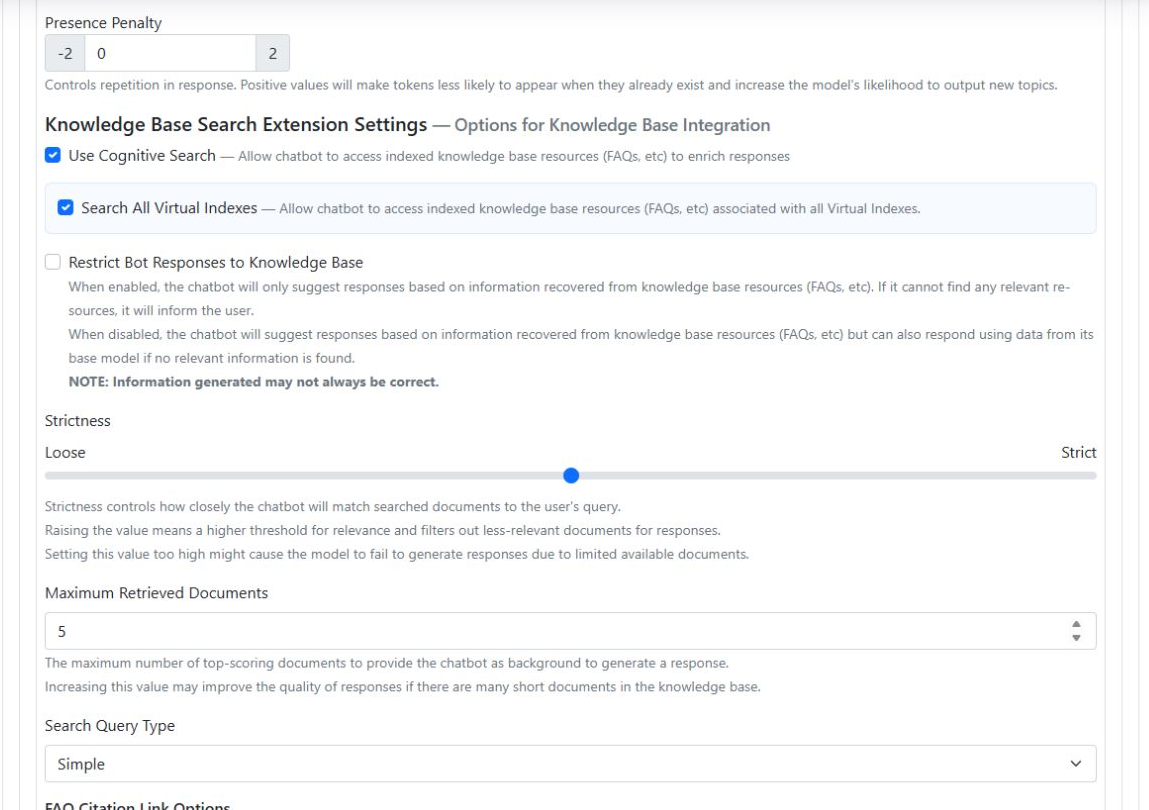
These screenshots show real controls in a Chime development environment, inspected October 28, 2026. They illustrate configurable capabilities, not a customer's production settings. Sensitive values are covered with solid redaction blocks.
 View full size
 Connect an Azure OpenAI resource
 View full size
 Connect knowledge ingestion and search
 View full size
 Place an AI node in a chat workflow/pipeline
 View full size
 Control how the chatbot uses knowledge
Who controls what
The customer approves AI enablement. Authorized administrators and managers configure the experience, and human agents decide what AI-suggested replies get sent.
Customer tenant administrator
Approves AI enablement when the organization requests AI features and tracks model updates and retirements.
Authorized tenant administrator
Configures enabled features. This may be an Instant Technologies administrator or the customer's administrator.
Manager
Edits chatbot prompts and chat workflows/pipelines within their assigned permissions.
Human support agent
A person on your support team. Reviews AI-suggested replies and decides what to send to the user.
Human review & handoff
A suggestion is not a sent reply.
When AI suggests a reply, a human agent on your team can review it, edit it, or decide not to send it.
- AI suggests a reply
- Human agent reviews and edits
- Human agent chooses what to send
Customer-facing chatbots are a separate experience. Managers can edit their prompts, while chat workflows/pipelines can define routing and failure handling. Confirm the configured human handoff and error paths for each deployment.
Testing & model changes
Test the complete conversation
End-to-end testing uses the web chat or Microsoft Teams client, including reply suggestions for human agents where enabled. Test cases should reflect the customer's configured workflow and use cases.
Confirm the deployed model
The tenant administrator tracks model updates and retirements. The model deployment and version should be identified for the tenant under review.
Data & service providers
Chime uses Microsoft Azure services for optional AI capabilities, including Azure OpenAI for generation features and Azure services for translation. The data sent to a service depends on the feature and tenant configuration.
How the inspected knowledge setup fits together
- Content in Azure Blob Storage
- Azure AI Search index and retrieval
- Context for Azure OpenAI responses
The inspected settings connect three distinct Azure resources: an Azure OpenAI resource for model deployments, an Azure AI Search service for retrieval, and a storage account for document ingestion. Azure's portal confirms the matching resource types. An embedding deployment is also configured for vector representations of content; the example chatbot shown above currently selects the Simple query type.
These are separate functions: storing or indexing knowledge is not the same as training a language model. Search and generation behavior depends on the node's retrieval settings, selected knowledge scope, and prompts.
Common review questions
Does every Chime V5 customer use AI?
No. Chime V5 supports tenants with and without AI. A product feature description does not establish that the feature is enabled for a particular customer.
Are reply suggestions the same as an AI chatbot?
No. Reply suggestions go to a human agent, a person on your support team, for review before anything is sent. A customer-facing AI chatbot operates within the configured chat workflow/pipeline and may respond before a human joins.
Are answers retrieved or generated?
That depends on the configured feature and knowledge sources. Azure OpenAI can generate responses using configured context. Customer content used for retrieval should not be described as model training. Confirm the actual retrieval and generation configuration for the tenant being assessed.
What happens when AI cannot answer or a provider is unavailable?
Failure handling and routing can be configured in the chat workflow/pipeline. The tenant's actual configuration determines the path; an automatic fallback should not be assumed for every deployment.
Which AI model and version does Chime use?
Azure OpenAI supports Chime's optional generation features. The specific deployment and model version must be confirmed for the applicable tenant; there is no single model version stated here for all customers.
Does an AI-disabled tenant still have subprocessors?
Yes. Chime is built on Microsoft Azure, so Microsoft is a subprocessor whether or not AI is enabled.
Always used
- Microsoft Azure: application hosting and the separate database for each tenant (customers can choose to host their own database)
Added when AI features are enabled
- Azure OpenAI: AI-generated answers, reply suggestions, and summaries
- Azure AI Search: knowledge search and retrieval
- Azure Blob Storage: knowledge content for indexing
- Azure translation services: multilingual conversations
Ask us for the complete, current list and the applicable contractual terms.
Does this page replace a governance policy or contract?
No. This page describes product capabilities and operating practices. Formal policies, test evidence, risk approvals, data-processing terms, and notification commitments require their applicable supporting records.
Ask about AI for your tenant
Whether you are evaluating Chime, configuring AI for your tenant, or working through a security review, our team can help. Tell us which features you are looking at and what you need.
Ask about AI for your tenant